
LegalOn Review: AI Contract Review Simplified
Table of Contents
- LegalOn Review: A Closer Look at LegalOn AI Contract Review Platform
- Introduction
- What Sets LegalOn AI Contract Review Platform Apart?
- LegalOn AI Capabilities: The Core Features
- Microsoft Word Integration: LegalOn AI Tools Where Lawyers Work
- LegalOn Pricing: Understanding the Costs
- Security and Compliance: Keeping Data Safe
- Real User Feedback: Perspectives from Legal Professionals
- LegalOn Review: Pros and Cons
- Comparing LegalOn to Alternative AI Contract Review Platforms
- Bottom Line: LegalOn AI Platform’s Suitability
- LegalOn Review: A Closer Look at LegalOn AI Contract Review Platform
- Introduction
- What Sets LegalOn AI Contract Review Platform Apart?
- LegalOn AI Capabilities: The Core Features
- Microsoft Word Integration: LegalOn AI Tools Where Lawyers Work
- LegalOn Pricing: Understanding the Costs
- Security and Compliance: Keeping Data Safe
- Real User Feedback: Perspectives from Legal Professionals
- LegalOn Review: Pros and Cons
- Comparing LegalOn to Alternative AI Contract Review Platforms
- Bottom Line: LegalOn AI Platform’s Suitability
LegalOn Review: A Closer Look at LegalOn AI Contract Review Platform
Introduction
The appeal of AI in contract review diminishes with extensive setup requirements. LegalOn promises immediate value through 50+ pre-built playbooks maintained by in-house attorneys. Achieving a 92/100 accuracy score and offering Microsoft Word integration, LegalOn is positioned as a turnkey solution for legal teams seeking AI assistance without setup hassles.
What Sets LegalOn AI Contract Review Platform Apart?
LegalOn promises Day 1 productivity without AI training, as highlighted in this article. It includes over 50 pre-built playbooks for common contract types like NDAs and vendor contracts. These are continuously updated by LegalOn’s legal team to reflect changing standards. This approach is ideal for mid-sized firms without resources for custom AI training programs, though it may limit large firms with specialized standards.
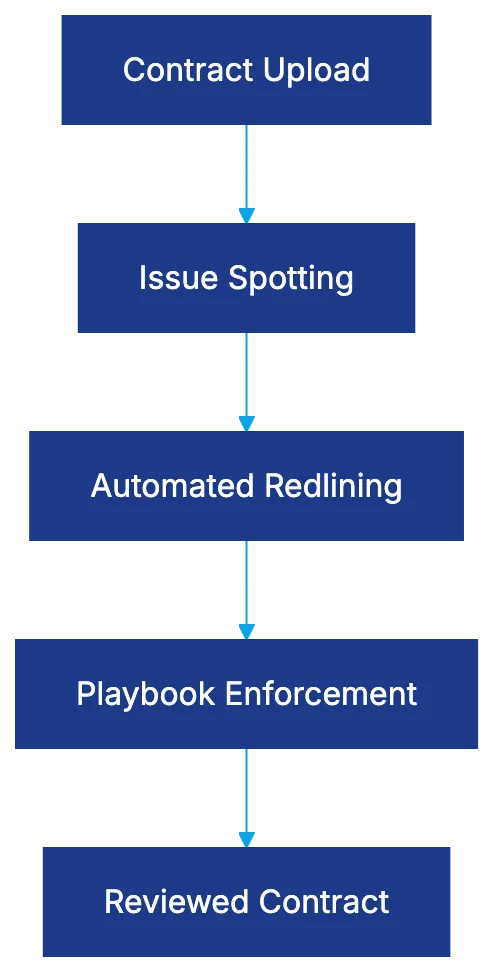
LegalOn Core Capabilities:
LegalOn AI Capabilities: The Core Features
- Issue Spotting: Scans for missing clauses, deviations, and risky provisions, flagging concerns like missing liability clauses.
- Automated Redlining: Suggests revisions based on playbook standards, offering alternatives for problematic language.
- Playbook Enforcement: Checks contracts against preferred positions, outlining ideal language and hard limits.
The 92/100 accuracy score measures effectiveness in spotting issues and applying playbook standards.
LegalOn Contract Review Workflow:
Microsoft Word Integration: LegalOn AI Tools Where Lawyers Work
LegalOn’s Word integration allows review without switching platforms. You can open contracts, use the LegalOn panel, and track changes within Word, saving time and avoiding technical headaches. However, a stable internet connection is necessary.
LegalOn Pricing: Understanding the Costs
LegalOn follows an enterprise model with customized quotes, starting at $15,000 to $25,000 annually for small teams. It includes unlimited usage, playbooks, updates, and support. Customization may incur extra fees.
Security and Compliance: Keeping Data Safe
LegalOn has SOC 2 Type II certification, encrypting contracts with AES-256 and TLS. Customer contract data isn’t used for AI model training, protecting confidentiality.
Real User Feedback: Perspectives from Legal Professionals
Reviews on platforms like G2 and Capterra rate LegalOn 4.6 to 4.8 stars for ease of setup and effective issue spotting. Criticisms focus on limited customization. The Word integration is highly appreciated.
LegalOn Review: Pros and Cons
Pros:
LegalOn vs Alternative Platforms Comparison:
- Immediate productivity without training.
- Attorney-maintained playbooks ensure updated content.
- Word integration encourages adoption among legal professionals.
Cons:
- Limited customization may not suit specialized firms.
- Enterprise pricing may be high for small firms.
- Lacks advanced analytics found in other platforms.
Comparing LegalOn to Alternative AI Contract Review Platforms
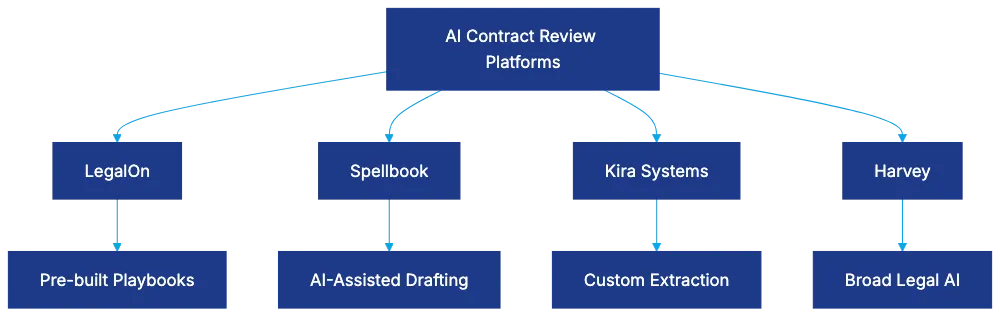
- Spellbook: Focuses on AI-assisted drafting; ideal for drafting needs.
- Kira Systems: Offers advanced customization and extraction capabilities.
- Harvey: A broader legal AI platform for comprehensive capabilities.
Bottom Line: LegalOn AI Platform’s Suitability
LegalOn offers immediate AI contract review value with its attorney-maintained playbooks, accuracy, and Word integration. Evaluate if its playbooks and customization fit your needs. Request examples during demos to ensure it aligns with your practice.
Frequently Asked Questions
How long does it take to implement LegalOn in my legal team?
LegalOn is designed for immediate productivity, requiring minimal setup time. Users can start benefiting from its features on Day 1 without extensive training or training periods, making it suitable for teams looking for quick integration.
What types of contracts can LegalOn review?
LegalOn's pre-built playbooks cover common contract types such as NDAs and vendor contracts. These playbooks are regularly updated by LegalOn's in-house legal team to comply with evolving standards, allowing for effective review across various contract formats.
Can I customize the playbooks for my firm's specific needs?
While LegalOn offers a robust set of pre-built playbooks, customization options may be limited. This could be a drawback for larger firms with specialized contract standards that require tailored provisions or analytics not available within the existing framework.
What is the pricing structure for LegalOn?
LegalOn follows an enterprise pricing model, with costs starting between $15,000 and $25,000 annually for small teams. This includes access to unlimited usage, ongoing updates, and support, but keep in mind that additional customization may incur extra costs.
How does LegalOn ensure the security of my contract data?
LegalOn is SOC 2 Type II certified, meaning it adheres to stringent security practices. It utilizes AES-256 encryption and TLS for contract data protection, and customer data is not used for AI model training to maintain confidentiality.
Can I use LegalOn directly within Microsoft Word?
Yes, LegalOn integrates seamlessly with Microsoft Word, allowing users to review contracts without leaving the platform. This feature enhances efficiency as changes can be tracked within Word, provided you have a stable internet connection for access.
What feedback have legal professionals shared about LegalOn?
Many users rate LegalOn highly, with scores between 4.6 and 4.8 stars on platforms like G2 and Capterra, particularly praising its ease of setup and efficacy in spotting issues. However, some users have noted the limitations in customization as a potential drawback.
Related Articles

Harvey AI Review: Advanced Legal AI for Law Firms
Explore how Harvey AI transforms legal workflows, offering tailored solutions and superior performance for large law firms.

Understanding E-Discovery Software in 2026
Explore how AI-powered e-discovery software transforms legal document review with efficiency and accuracy.

Review of Spellbook AI for Legal Professionals
Explore how Spellbook AI enhances contract drafting and review for legal professionals with Microsoft Word integration.