
Legal Practice Management Software: Key Features & AI Insights
Table of Contents
- Introduction
- Understanding Legal Practice Management Software Categories
- Trust Accounting and IOLTA Compliance Fundamentals
- How AI-Powered Automated Time Capture Actually Works
- Clio: Matter-Aware AI and Deep Integration Ecosystem
- Smokeball: Built-In Automatic Time Tracking Sets It Apart
- Filevine: Extreme Customizability Through AI Building Blocks
- MyCase and PracticePanther: Accessible Solutions for Small to Mid-Sized Firms
- All-In-One Versus Best-of-Breed: Making the Right Architecture Decision
- Implementation Considerations: What Actually Makes Adoption Succeed or Fail
- Bottom Line
- Introduction
- Understanding Legal Practice Management Software Categories
- Trust Accounting and IOLTA Compliance Fundamentals
- How AI-Powered Automated Time Capture Actually Works
- Clio: Matter-Aware AI and Deep Integration Ecosystem
- Smokeball: Built-In Automatic Time Tracking Sets It Apart
- Filevine: Extreme Customizability Through AI Building Blocks
- MyCase and PracticePanther: Accessible Solutions for Small to Mid-Sized Firms
- All-In-One Versus Best-of-Breed: Making the Right Architecture Decision
- Implementation Considerations: What Actually Makes Adoption Succeed or Fail
- Bottom Line
Introduction
Legal practice management software has evolved into comprehensive platforms handling everything from client intake to trust accounting. With AI capabilities now integrated, law firms face both opportunities and complexities. The right software can recapture lost billable hours and ensure IOLTA compliance. The wrong choice or poor setup creates audit headaches and leaves money on the table. This guide examines how major platforms like Clio, Smokeball, and Filevine differ and highlights crucial features for trust accounting, automated time tracking, and legal case management. Clio, Smokeball, and Filevine are leading legal practice management platforms offering comprehensive solutions for law firms.
Understanding Legal Practice Management Software Categories
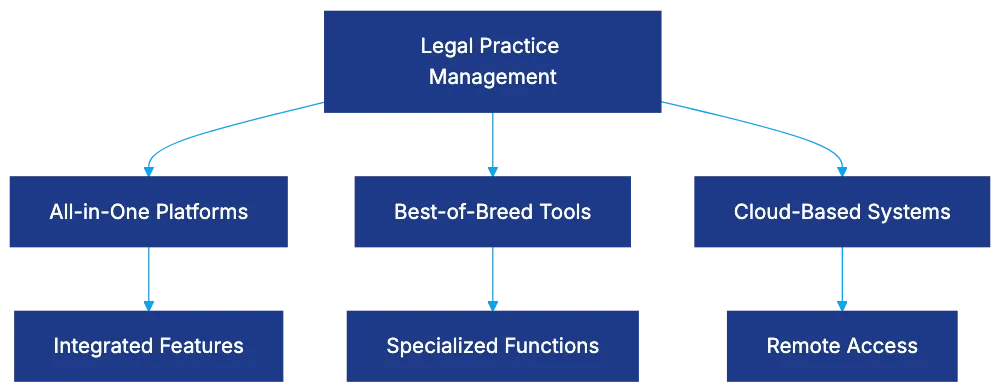
Legal case management falls into distinct categories:
-
All-in-one platforms bundle case management, time tracking, billing, client communication, document management, and trust accounting. Clio, Smokeball, and MyCase offer integration but may lack specialized depth.
-
Best-of-breed approaches involve selecting specialized tools for each function. This allows choosing the strongest tool for each function but creates integration challenges.
-
Cloud-based platforms dominate, offering access and updates, with security concerns resolved through certifications and encryption. On-premise solutions exist but are declining.
Legal Practice Management Software Categories:
Firm size impacts selection. Solo and small firms need affordable systems. Mid-sized firms require strong controls and integration. Large firms need enterprise-grade customization and support.
Trust Accounting and IOLTA Compliance Fundamentals
Trust accounting is technically demanding in law firm management software, with violations a leading cause of bar discipline. The American Bar Association provides guidelines and resources to assist law firms in maintaining compliance with trust accounting regulations.
- Three-way reconciliation is required, matching the bank statement balance, the trust ledger balance, and all client ledger balances.
Trust Accounting Three-Way Reconciliation Process:

Platforms like Clio and Filevine automate reconciliation, flagging discrepancies to prevent errors like disbursing more than a client’s balance. They provide transaction reports for audits. Compliance requires maintaining records and detailed reporting for IOLTA programs.
How AI-Powered Automated Time Capture Actually Works
Despite predictions of alternative fee arrangements, the billable hour remains key. Manual time entry leads to misestimations. AI-powered tracking resolves this through passive monitoring, matching activities to clients via machine learning. Intapp Time offers AI-driven time tracking solutions designed to enhance billing accuracy and efficiency for legal professionals.
Firms using automated tracking report revenue increases. For example, a firm billing at $300/hour, recapturing 20% of lost time, adds $480,000 annually.
AI-Powered Time Capture Workflow:

AI suggestions need attorney review, and privacy considerations matter. Policies, training, and data usage boundaries are essential.
Clio: Matter-Aware AI and Deep Integration Ecosystem
Clio serves over 150,000 legal professionals globally with user-friendly design and extensive integrations, supporting over 250 applications.
Clio Duo, its AI assistant, monitors work and suggests time entries. Matter-aware AI creates proactive alerts for potential issues.
Complex integration increases with more tools. Clio offers tiered pricing, with trust accounting costing extra. Software Advice provides detailed reviews and pricing information for Clio and other legal practice management software.
Smokeball: Built-In Automatic Time Tracking Sets It Apart
Smokeball offers fully integrated automatic time tracking within its platform, capturing time in real-time.
It claims significant unbilled time capture annually, capturing calls, emails, and document reviews.
Using Smokeball requires working within its platform, offering over 20,000 pre-built legal forms for time savings.
Filevine: Extreme Customizability Through AI Building Blocks
Filevine emphasizes customization and workflow automation with AI features.
SidebarAI answers questions about matters. AIBlocks and AIFields automate workflows and document assembly.
Filevine’s customizability may require knowledgeable staff or consultants for setup.
MyCase and PracticePanther: Accessible Solutions for Small to Mid-Sized Firms
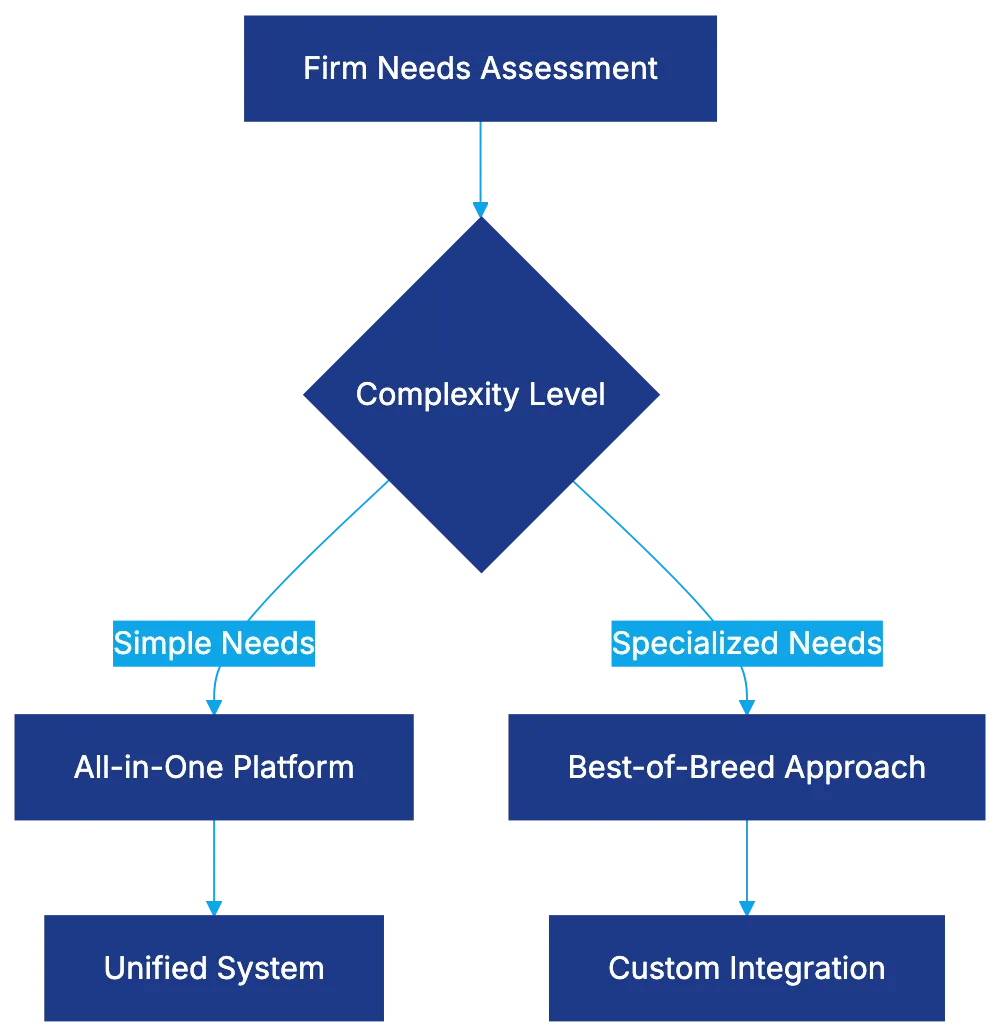
Software Architecture Decision Framework:
MyCase and PracticePanther offer case management, time tracking, billing, and trust accounting for solo and small to mid-sized firms.
MyCase’s Smart Time Finder addresses time leakage, recapturing revenue for small firms.
Both provide user-friendly design and quick setup but offer less customization than Filevine.
All-In-One Versus Best-of-Breed: Making the Right Architecture Decision
The all-in-one vs. best-of-breed debate extends beyond legal technology:
-
All-in-one platforms offer unified data models but may lack depth.
-
Best-of-breed allows choosing strong tools per function, but challenges increase.
Firm size, sophistication, and practice area influence approach.
Implementation Considerations: What Actually Makes Adoption Succeed or Fail
Success requires more than software selection; setup and adoption are crucial. Data migration, training, and permission structures need thoughtful planning.
Integration requires time, facing potential issues.
Measure success to ensure software delivers ROI.
Bottom Line
Legal practice management software is essential for modern law firms. AI in time recording offers financial benefits and reduces trust accounting risk. Platform choice depends on firm needs and capabilities. Proper setup and change management ensure software success.
Frequently Asked Questions
What should I consider when selecting legal practice management software?
When choosing legal practice management software, evaluate factors such as your firm’s size, budget, and specific needs. Consider whether an all-in-one platform or a best-of-breed approach better suits your requirements, and pay attention to features like trust accounting compliance, integration capabilities, and workflow automation.
How does trust accounting software help with compliance?
Trust accounting software assists in ensuring compliance by automating critical processes like three-way reconciliation of bank statements, trust ledgers, and client ledgers. This minimizes human error and enhances oversight, helping law firms adhere to IOLTA regulations and prevent costly violations.
Can small firms benefit from using legal practice management software?
Absolutely. Legal practice management software can streamline operations for small firms by improving time tracking, billing, and case management, thereby enhancing efficiency and profitability. Some platforms, like MyCase and PracticePanther, are designed specifically to meet the needs of small to mid-sized firms.
What advantages does AI-powered time tracking offer?
AI-powered time tracking enhances billing accuracy and recovers lost billable hours by passively monitoring activities and linking them to client matters. This automated approach can significantly increase revenue while freeing up attorneys from manual time entry tasks, allowing them to focus more on their legal work.
How important is integration with other applications in legal practice management software?
Integration is crucial as it allows different functionalities—like time tracking, billing, and client communication—to work seamlessly together. This prevents data silos and ensures that all tools used by a firm complement each other, ultimately enhancing overall productivity.
What are the training requirements for implementing new legal software?
Implementing new legal software typically requires comprehensive training for staff to ensure proper usage. Training should cover software features, best practices for data entry and management, and address any concerns regarding integration with existing workflows to ensure a smooth transition.
How can I measure the success of legal practice management software?
Success can be measured through various metrics, including increased revenue from recovered billable hours, reduced administrative workload, and compliance with trust accounting regulations. Gathering feedback from staff on usability and tracking performance against pre-defined goals will help assess the software's return on investment.
Related Articles
AI Transforming Law: Complete Guide for Legal Professionals
Discover how AI in legal is reshaping law firms. From 64% of Am Law 100 using AI to 40-60% review reductions, explore the transformation happening now.

12 Best AI Tools for Lawyers in 2026
Discover the top AI software for attorneys in 2026. Expert reviews of legal AI tools covering research, drafting, e-discovery, and practice management.