
A Comprehensive Guide to Legal Document Automation
Table of Contents
- Introduction
- The Critical Difference Between Templates and Automation
- Understanding Conditional Logic in Legal Automation
- Docassemble Technical Architecture Deep Dive
- ROI Benefits and Productivity Metrics
- Compliance Document Use Cases
- Dedicated Tools Versus CLM Automation Features
- Implementation Best Practices and Change Management
- Bottom Line
- Introduction
- The Critical Difference Between Templates and Automation
- Understanding Conditional Logic in Legal Automation
- Docassemble Technical Architecture Deep Dive
- ROI Benefits and Productivity Metrics
- Compliance Document Use Cases
- Dedicated Tools Versus CLM Automation Features
- Implementation Best Practices and Change Management
- Bottom Line
Introduction
Legal document automation has advanced with modern software using conditional logic and database integration to streamline document creation, enhancing efficiency and accuracy. Legal document automation: 7 key benefits This guide covers legal document automation basics, platforms like Docassemble, and strategies for firms.
The Critical Difference Between Templates and Automation
Template vs Automation Comparison:
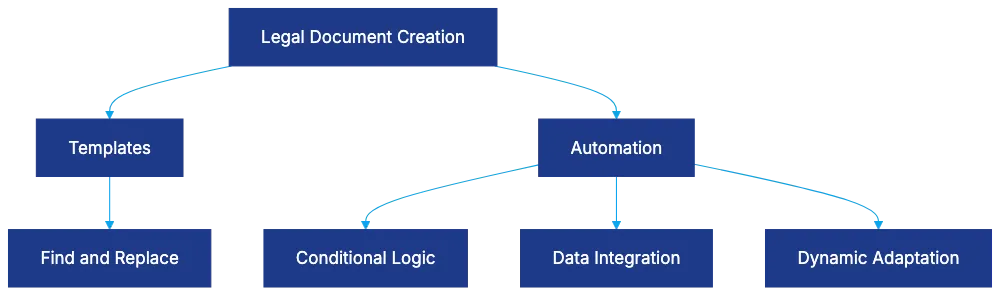
Legal professionals often mistake templates for automation. What is Legal Automation? 5 Major Benefits in 2026 Templates use simple find-and-replace, lacking intelligence. Automation, however, integrates client data, uses conditional logic, and adapts documents to specific cases, significantly improving time and error reduction, such as reducing six-hour tasks to ninety minutes.
Understanding Conditional Logic in Legal Automation
Conditional Logic Flow:
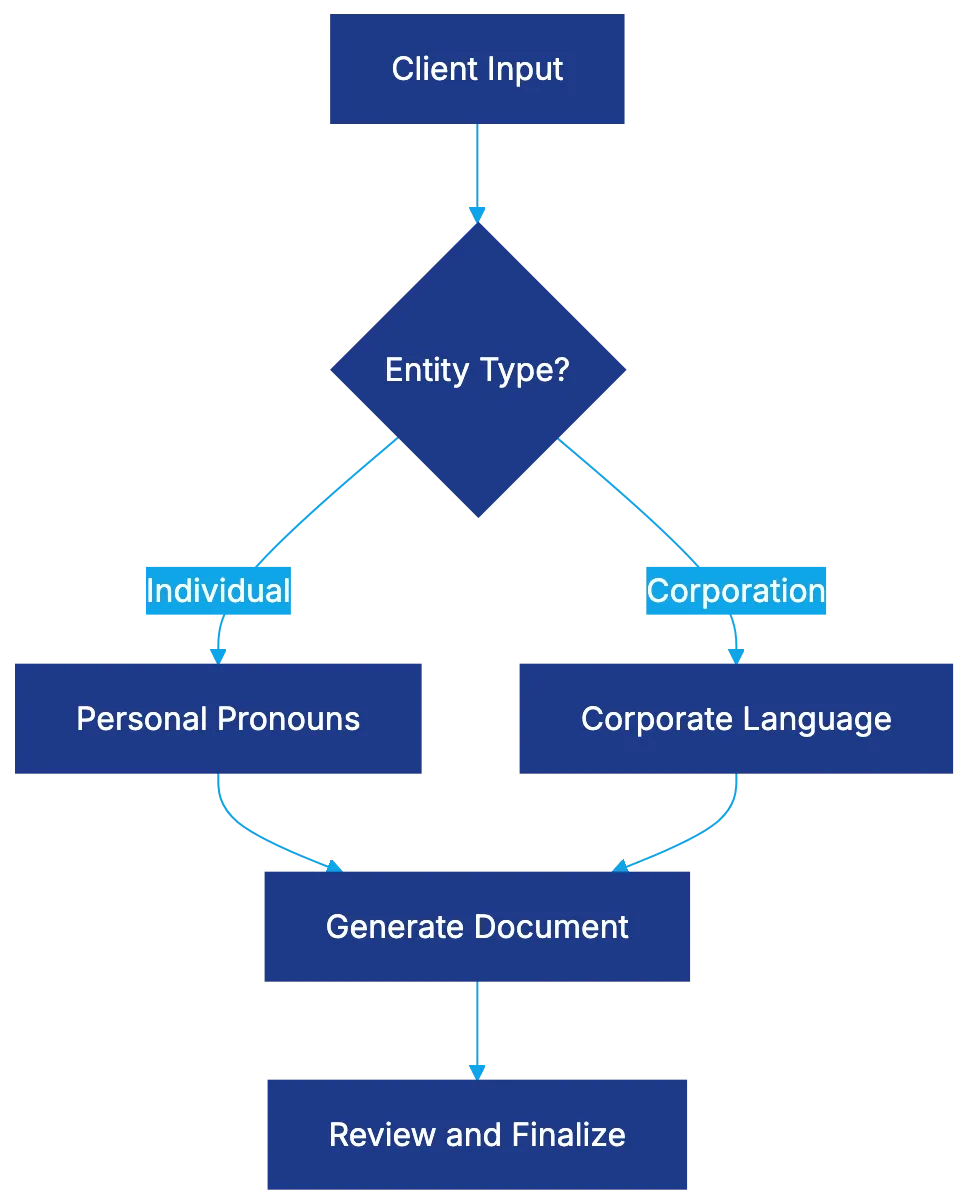
Conditional logic allows documents to adapt based on inputs, crucial for varying legal needs. IF/ELSE statements avoid multiple templates with dynamic content. Pronoun and verb agreement, nested conditions, loops for variable lists, and calculations ensure accuracy and efficiency.
Docassemble Technical Architecture Deep Dive
Docassemble Platform Architecture:

Docassemble, an open-source platform, combines Python, YAML, and Markdown. Its Docker deployment suits firms prioritizing data security or simplicity. Document output flexibility suits diverse needs, and automated interview flow and touchscreen signature capability improve user experience. OpenAI API integration further enhances document drafting.
ROI Benefits and Productivity Metrics
Automation offers significant savings. A firm could reduce document preparation costs from $280,000 to $12,500 annually. Error reduction and client satisfaction also improve, with same-day service providing competitive advantages. Automation scales operations affordably and maintains billing rates while enhancing profitability.
Compliance Document Use Cases
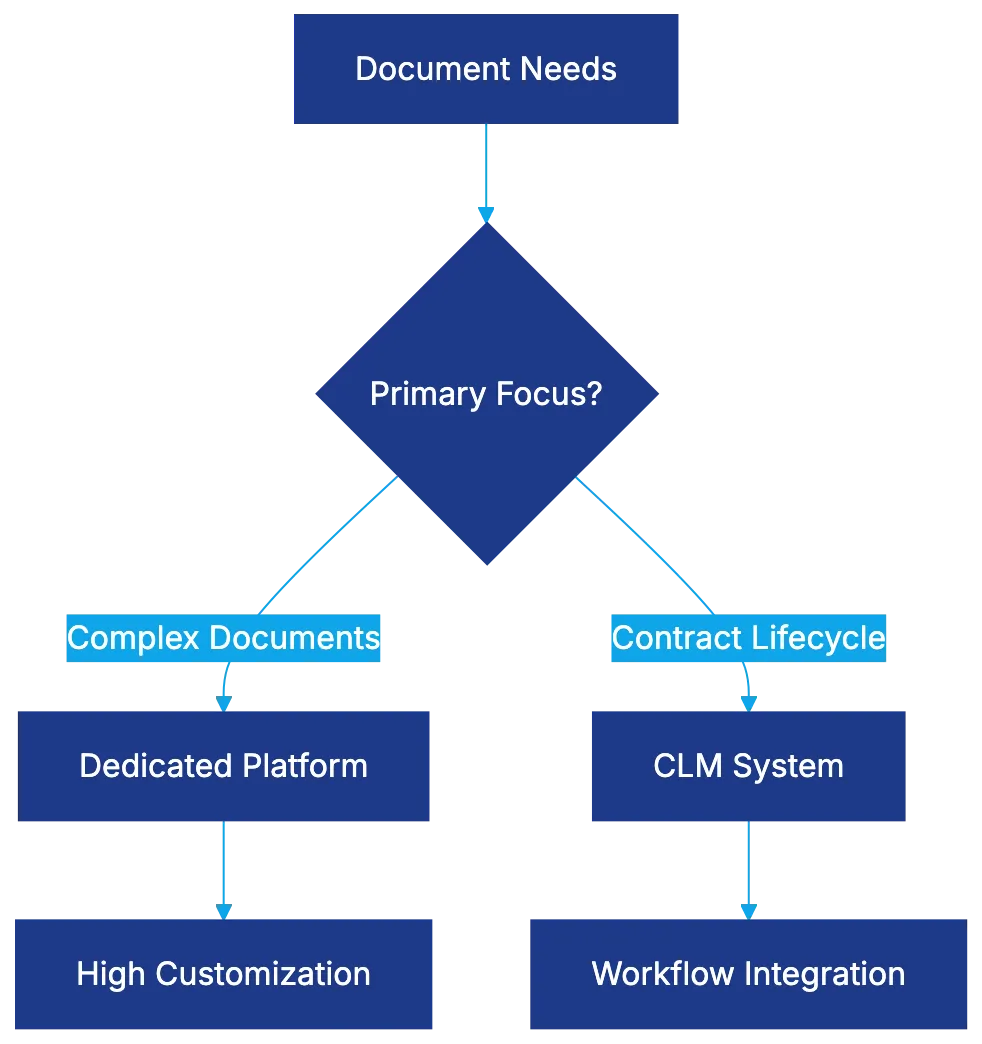
Platform Selection Decision:
Automation is beneficial for compliance documents due to their high volume and error intolerance. Automated systems streamline tasks like privacy policy updates and compliance documentation across industries, ensuring adherence to regulations efficiently.
Dedicated Tools Versus CLM Automation Features
The choice between dedicated document automation platforms and CLM systems depends on needs. Dedicated platforms like HotDocs and Docassemble are suited for complex documents, while CLM systems like Ironclad and Evisort integrate contract management workflows. Costs and integration needs should guide selection.
Implementation Best Practices and Change Management
Success relies on selecting high-value documents, investing in quality templates, regular reviews, and comprehensive training. Attending to adoption metrics and integrating into client processes can ensure effective implementation. Document automation transforms both back-office and client-facing operations.
Bottom Line
Legal document automation has matured, offering substantial time savings and error reduction, demonstrating significant ROI. Proper implementation, focusing on high-value areas, and integrating technology into workflows grants competitive advantages, making it a critical investment for modern legal practices.
Frequently Asked Questions
What is the primary difference between templates and automation in legal documents?
Templates typically involve simple find-and-replace operations without intelligence, while automation features advanced capabilities like integrating client data and using conditional logic. Automation provides a more dynamic approach, allowing documents to adapt based on specific cases, significantly reducing time and errors.
How does conditional logic enhance legal document automation?
Conditional logic enables documents to change based on user inputs, which helps create more personalized and accurate legal documents. By using IF/ELSE statements and loops, legal professionals can avoid managing multiple templates, thereby streamlining the document generation process.
What is Docassemble, and how can it benefit my legal practice?
Docassemble is an open-source platform designed for legal document automation, using Python, YAML, and Markdown. It enhances user experience through automated workflows, flexible document outputs, and features like touchscreen signatures, making it particularly useful for firms focusing on user-friendly interfaces and security.
What kind of return on investment (ROI) can I expect from implementing document automation?
Implementing document automation can lead to substantial cost reductions, with some firms slashing document preparation costs from $280,000 to $12,500 annually. Additionally, improvements in error reduction and client satisfaction, along with the ability to provide same-day services, can offer significant competitive advantages.
Why is automation particularly appropriate for compliance documents?
Compliance documents often involve high volumes and a low tolerance for errors, making automation an ideal solution. Automated systems can efficiently handle tasks like updating privacy policies and ensuring compliance across various industries, thus streamlining adherence to regulations.
Should I choose a dedicated document automation platform or a Contract Lifecycle Management (CLM) system?
The choice depends on your specific needs; dedicated platforms like HotDocs and Docassemble excel with complex documents, while CLM systems like Ironclad and Evisort focus on integrating workflow for contract management. Consider factors such as costs, functionality, and existing systems when making your decision.
What are best practices for successfully implementing legal document automation?
Successful implementation involves selecting key, high-value documents to automate, investing in quality templates, providing thorough training, and regularly reviewing processes. Tracking adoption metrics and ensuring integration into client workflows are also essential for effective long-term use.