Law Insider Subscription: Pricing, Trial & Review
Table of Contents
- Introduction: Law Insider Subscription Overview
- What a Law Insider Subscription Currently Includes
- Law Insider Pricing: How to Verify the Real Cost
- Trial, Renewal, and Law Insider Cancellation
- Team Access, Security, and Administrative Questions
- Law Insider Reviews and Real-World Value
- Legal AI Tools and CLM Alternatives for Research and Drafting
- Law Insider Subscription Decision Checklist
- Bottom Line
- Introduction: Law Insider Subscription Overview
- What a Law Insider Subscription Currently Includes
- Law Insider Pricing: How to Verify the Real Cost
- Trial, Renewal, and Law Insider Cancellation
- Team Access, Security, and Administrative Questions
- Law Insider Reviews and Real-World Value
- Legal AI Tools and CLM Alternatives for Research and Drafting
- Law Insider Subscription Decision Checklist
- Bottom Line
Introduction: Law Insider Subscription Overview
A Law Insider subscription now covers much more than searching public contracts. Following a product change announced in May 2026, paid individual access is packaged as SimpleAI, combining the Law Insider database with AI-assisted drafting, review, redlining, templates, playbooks, and a Microsoft Word add-in.
The package may suit lawyers who regularly negotiate contracts but be excessive for occasional clause research. Because pricing, trial terms, and product names have changed, older reviews may describe discontinued plans.
This guide covers:
- What subscribers currently receive
- How to verify the price before paying
- How trial conversion, renewal, and cancellation work
- What firms should examine before buying multiple seats
- Which alternatives fit clause research, drafting, or contract lifecycle management
Plan details were checked in July 2026; verify them on official pages before purchasing.
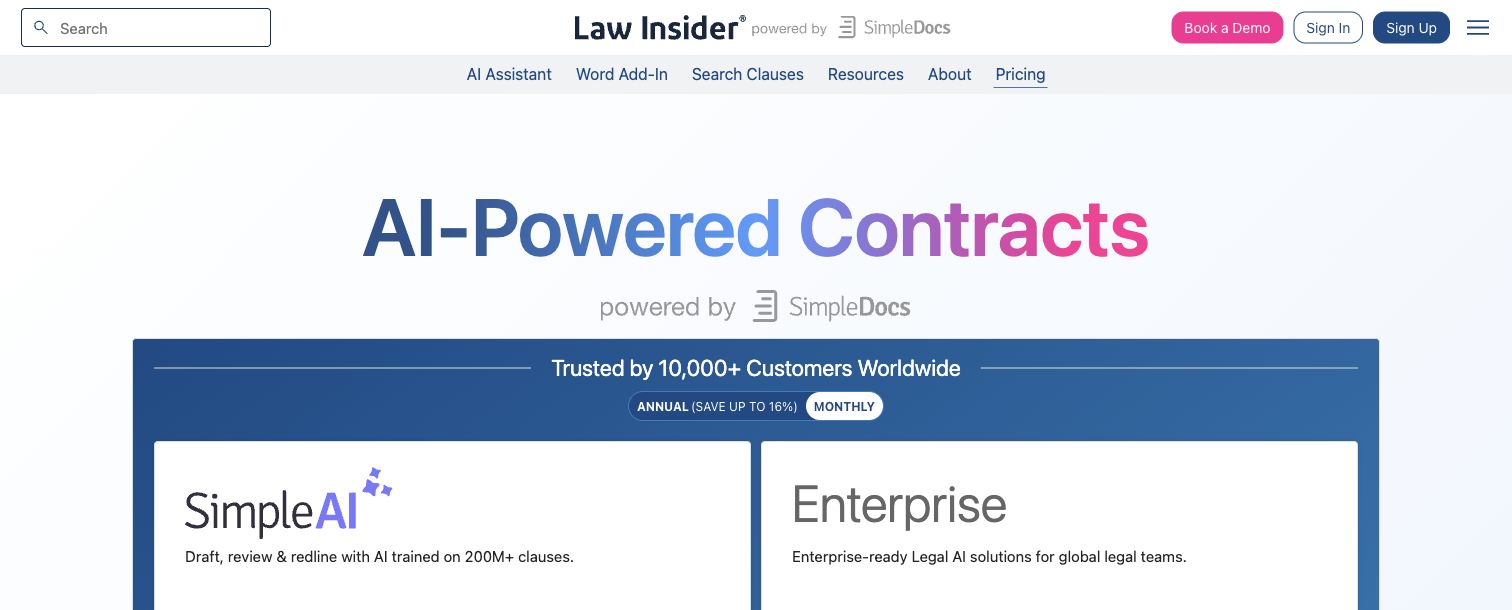
Screenshot: Law Insider’s official pricing page, captured July 2026. Pricing and plan details can change.
What a Law Insider Subscription Currently Includes
The current Law Insider subscription combines database access with an AI-enabled contract workspace. According to the official Law Insider pricing page, SimpleAI includes access to more than 20 million contracts and 200 million clauses. Law Insider also says more than 10,000 organizations use its products.
The individual package includes:
- Contract clause research: Search public agreements and review provisions in context.
- AI drafting: Generate clauses or draft language in a browser.
- Review and redlining: Analyze uploaded contracts, identify issues, and propose revisions.
- Playbooks and templates: Apply standard review positions and drafting materials.
- Microsoft Word access: Draft, review, and respond to suggestions without switching between Word and a browser.
- Multilingual work: Law Insider states that its drafting and review tools support multiple languages.
| Access level | Typical access | Best fit |
|---|---|---|
| Free access | Limited database searching and results | Occasional research or initial evaluation |
| SimpleAI | Full database, AI drafting and review, playbooks, templates, and Word integration | An individual who drafts or reviews contracts regularly |
| Enterprise | Team controls, custom playbooks, repositories, benchmarking, integrations, and support | Legal departments and larger law firms |
An occasional clause researcher has different needs from counsel reviewing 15 vendor contracts monthly. Test the workflow, not the feature count.
Law Insider Pricing: How to Verify the Real Cost
Law Insider pricing offers annual and monthly billing. At review, SimpleAI cost $150 per user per month when billed annually ($1,800 yearly) or $179 per month. Enterprise pricing required contact with sales.
These figures are a dated snapshot. Before subscribing, open the live pricing page, switch between Annual and Monthly, select the relevant currency, and inspect the checkout screen.
| Cost question | What to verify | Why it matters |
|---|---|---|
| Billing frequency | Monthly payment or annual commitment | A displayed monthly rate may still be billed as one annual charge |
| Seat basis | Whether the amount is per user | Multiple seats can change the total substantially |
| Currency and tax | Selected currency, VAT, sales tax, and invoice details | The card charge may exceed the headline figure |
| Trial conversion | Conversion date and selected paid plan | The seven-day trial currently renews automatically |
| Enterprise quote | Seat minimums, setup, support, and integrations | Public individual pricing does not describe the complete team cost |
Law Insider says all legacy plans were upgraded to SimpleAI plans in May 2026. Older pricing references are therefore unreliable. LEGAVIMA’s broader Law Insider review remains useful for understanding clause research, public-filing coverage, and workflow fit, but its older plan figures should not replace the current checkout terms.
Keep a dated screenshot of the offer, billing period, renewal date, and checkout terms to prevent costly pricing misunderstandings.
Trial, Renewal, and Law Insider Cancellation
SimpleAI offers a seven-day full-access trial requiring payment details. The trial automatically becomes a paid subscription unless canceled before it ends.
During the trial:
- Record the exact trial start and conversion dates shown at checkout.
- Set two calendar reminders, ideally 48 hours and 24 hours before conversion.
- Test representative documents, not only harmless samples.
- Review clause-search quality, redline accuracy, Word compatibility, and export needs.
- Decide before the deadline and retain proof of cancellation or purchase approval.
For cancellation, the official support article directs users to the account page and its Manage Premium Subscription section. The pricing FAQ says cancellation can be completed from account settings and that paid access remains active until the end of the current billing period.
| Cancellation item | What to check | Why it matters |
|---|---|---|
| Account identity | Confirm the email associated with payment | Multiple work and personal accounts can cause confusion |
| Cancellation status | Look for an on-screen confirmation and email | Closing a browser window is not proof of cancellation |
| Access end date | Record the displayed expiration date | Teams need time to preserve permitted work product |
| Renewal charge | Check the card statement after the expected date | Billing errors are easier to address promptly |
| Support record | Save any ticket number and correspondence | It documents the request if account status is disputed |
Cancellation normally stops renewal but does not guarantee a refund. If controls are missing, contact support before the deadline and preserve the timestamp.
Team Access, Security, and Administrative Questions
Buying one Law Insider subscription is straightforward; organization-wide deployment requires more scrutiny. Enterprise suits teams needing shared administration, custom playbooks, an AI repository, SSO, integrations, or dedicated support.
Before requesting a quote, estimate use by role. Partners may need benchmarking, associates AI redlining, and assistants precedent retrieval. Identical access without usage analysis can create shelfware.
| Item | What to Check | Why It Matters |
|---|---|---|
| Seat rules | Named-user requirements, reassignment, and minimum seats | Shared credentials may violate terms or weaken auditability |
| Document handling | Retention, deletion, processing locations, and subprocessors | Uploaded contracts may contain privileged or confidential material |
| AI governance | Human review, approved matters, and prohibited data | AI output can omit context or propose unsuitable language |
| Administration | SSO, role permissions, offboarding, and usage reporting | Departing personnel should lose access promptly |
| Integrations | Word, CRM, e-signature, repository, and CLM connections | Manual transfers create version and confidentiality risks |
| Commercial terms | Renewal notice, price adjustments, support, and termination | Enterprise obligations may differ from individual checkout terms |
Law Insider states on its pricing page that customer data is encrypted, is not used for training, and that the service is SOC 2 Type II and GDPR compliant. Firms should still review the contract, data-processing terms, and security materials. Certification does not resolve every matter-specific privilege or professional-conduct issue.
Law Insider Reviews and Real-World Value
Public Law Insider reviews raise concerns, but the Trustpilot sample is too small for a confident verdict. In July 2026, the Trustpilot profile showed a 2.8 score based on only three reviews, with no reviews posted during the preceding 12 months. Trustpilot itself warned that the feedback might not be representative.
One 2025 reviewer complained about automatic renewal and a lack of notification. Another older reviewer praised the resource. These accounts may inform trial reminders, but three opinions cannot establish typical product or service quality.
Four use cases offer a better framework:
- Negotiation benchmarking: An associate compares limitation-of-liability clauses from similar public agreements before challenging opposing counsel’s claim that its wording is standard.
- First-pass review: In-house counsel applies a playbook to vendor agreements, then verifies every suggested redline.
- Clause retrieval: A paralegal traces assignment provisions to their complete agreements before presenting them to the supervising lawyer.
- Template refresh: Legal operations staff compare an internal NDA against recent public language and approved fallback positions.
LawInsider earns its keep when frequent clause research and AI-assisted drafting justify the combined fee. For occasional work, free sources or a narrower tool may cost less.
Legal AI Tools and CLM Alternatives for Research and Drafting
No universal Law Insider alternative exists because clause research, legal AI, drafting software, and contract lifecycle management serve different purposes. Start with the most time-consuming job.
| Option | Primary job | Strongest fit | Main trade-off |
|---|---|---|---|
| Law Insider / SimpleAI | Public-clause research plus AI drafting and review | Professionals who want research and Word-based contract assistance together | It may exceed the needs of occasional researchers |
| SEC EDGAR | Free primary-source filing research | Users comfortable locating and reading public exhibits manually | Less convenient clause categorization and drafting support |
| Practical Law | Editor-maintained precedents and legal know-how | Lawyers who want annotated clauses, drafting notes, and negotiation guidance | Broader research subscription and jurisdiction-dependent coverage |
| Spellbook | AI contract drafting and review in Word | Teams whose main problem is revising their own documents | It is not a substitute for a broad public-contract database |
| Ironclad | Contract lifecycle management | Organizations needing intake, approvals, signatures, storage, and reporting | A larger setup than a research subscription |
| Internal clause library | Approved organizational language | Teams prioritizing consistency and institutional knowledge | Limited external market evidence unless actively maintained |
A hybrid approach may work best. A firm might use Law Insider for external comparables, contract drafting software for document work, its internal library for approved language, and CLM alternatives for workflow and obligations. The combination costs more, but each tool serves a distinct purpose.
Free SEC filings work when the researcher knows the company, agreement type, or filing. Practical Law is stronger when expert commentary and maintained drafting notes matter more than broad public language. Spellbook is an AI drafting assistant, while Ironclad manages contracts from request through storage.
Law Insider Subscription Decision Checklist
A short pilot should produce evidence. Do not approve a Law Insider subscription based on a polished demo or reject it based on a tiny review sample.
| Decision factor | What to measure during the trial | Practical threshold |
|---|---|---|
| Research frequency | Clause and contract searches per month | Regular use is easier to justify than occasional curiosity |
| Time saved | Minutes saved on each search or review | Compare savings with the fully loaded hourly cost of the user |
| Result quality | Relevant clauses found in the first 10 results | Poor retrieval creates more review work, not less |
| AI accuracy | Accepted, edited, and rejected suggestions | High rejection rates weaken the business case |
| Workflow fit | Word performance, exports, and handoffs | Friction can erase theoretical time savings |
| Coverage | Relevant industries, deal types, and jurisdictions | Public-contract breadth does not guarantee matter-specific coverage |
| Governance | Security, privilege, retention, and approvals | The tool must fit professional and client obligations |
| Commercial terms | Annual total, seats, tax, renewal, and exit rights | The headline Law Insider pricing figure is incomplete by itself |
For an ROI test, saving 30 minutes on eight monthly reviews recovers four hours. Compare those hours’ value with the subscription cost, subtracting AI-review time. Do not count redlines requiring substantial rewriting as savings.
The purchasing memo can be one page. Record the use case, pilot users, measured time, accuracy concerns, security approval, annual cost, and renewal owner. Assign a renewal owner so responsibility is clear before the charge appears.
Bottom Line
A Law Insider subscription now combines a large public-contract database with AI drafting, review, redlining, playbooks, and Word integration. The bundle best suits professionals who frequently research clauses and review contracts. It is less compelling for occasional precedent searches or firms with overlapping research, drafting, and CLM systems.
Before buying:
- Verify current Law Insider pricing on the official page
- Record the trial conversion and renewal dates
- Test representative contracts under approved security rules
- Measure time saved after human verification
- Preserve cancellation confirmation if the product is not a fit
Law Insider reviews may flag concerns, but three reviews should not drive the decision. A controlled pilot, documented terms, and comparison with research, drafting, and CLM alternatives provide stronger evidence.
Frequently asked questions
Who is most likely to benefit from a Law Insider subscription?
The subscription is best suited to lawyers and legal professionals who frequently research clauses, draft agreements, or review contracts in Microsoft Word. Occasional researchers may find limited free access or SEC EDGAR sufficient.
What should I test during the seven-day trial?
Use representative documents to evaluate search relevance, redline quality, playbook performance, Word compatibility, and export options. Track actual time saved after reviewing and correcting the AI’s suggestions.
How can I avoid an unexpected charge after the trial?
Record the exact conversion date displayed at checkout and set reminders at least 48 and 24 hours beforehand. If you cancel, retain the on-screen confirmation, email, and stated access-end date.
What should firms verify before uploading confidential contracts?
Review the provider’s data-processing terms, retention and deletion policies, processing locations, subprocessors, and security documentation. Firms should also confirm that use complies with client instructions, privilege obligations, and internal AI policies.
How should a team estimate the full subscription cost?
Calculate the annual charge across all required seats, then include taxes, implementation, support, integrations, and possible minimum commitments. Confirm whether licenses are assigned to named users and whether seats can be reassigned when staff change.
How can I tell whether the subscription provides a worthwhile return?
Measure research and review time before and during the pilot, including time spent checking AI output. Compare the value of verified hours saved with the total subscription cost and reject savings claims based on redlines that require substantial rewriting.
When should I choose another tool instead?
Use SEC EDGAR when free primary-source research is sufficient, or consider an editorial service when expert drafting guidance matters most. A Word-focused AI assistant may better fit document revision, while a dedicated CLM is more appropriate for intake, approvals, signatures, storage, and obligation tracking.
Is Law Insider free?
Law Insider offers limited free database access. Full database use, AI drafting, advanced review, templates, playbooks, and Word integration are part of the paid SimpleAI experience. Test free access first for occasional clause research.
How much does a Law Insider subscription cost?
In July 2026, the official Law Insider pricing page displayed $150 per user per month with annual billing, while the monthly option displayed $179. Prices, currencies, taxes, discounts, and packaging may change. Verify the live page and checkout total instead of relying on articles or search snippets.
Does the Law Insider trial renew automatically?
Yes. The official pricing FAQ says the seven-day SimpleAI trial continues automatically unless canceled before it ends. The trial requires payment information. Record the conversion date after registering.
Can I cancel Law Insider at any time?
Law Insider says users can cancel through account settings under Manage Premium Subscription. Access should continue through the paid billing period. Save the confirmation and expiration date. Cancellation does not automatically request a refund.
Can a team share one Law Insider account?
Do not assume an individual login is shareable. Confirm license terms and request an Enterprise quote for multiple users. Named accounts, SSO, role controls, and audit trails are safer than shared credentials.
Is Law Insider a CLM system?
Enterprise includes repository, workflow, and collaboration capabilities, but buyers should compare it with a dedicated CLM. Organizations needing intake forms, approval routing, e-signatures, obligation tracking, and portfolio reporting should evaluate a dedicated CLM.
Can lawyers rely on AI-generated clauses without review?
No. AI-generated language may omit deal context, conflict with the governing law, or depart from a client’s approved position. Check every output against the complete agreement, relevant jurisdiction, current law, and responsible lawyer’s instructions.