
Discover Juro: A Modern Approach to Contract Management
Table of Contents
- What Makes Juro Different in Contract Management
- How Juro CLM Works: The Browser-Native Advantage
- AI Features: What Actually Works
- Collaboration and Workflow Design
- Juro Pricing: What It Actually Costs
- Combining Capabilities and Tech Stack Fit
- Juro Compared to Ironclad and LinkSquares
- Setup Reality: What to Expect
- Who Should Actually Use Juro
- Common Implementation Pitfalls
- Bottom Line
- What Makes Juro Different in Contract Management
- How Juro CLM Works: The Browser-Native Advantage
- AI Features: What Actually Works
- Collaboration and Workflow Design
- Juro Pricing: What It Actually Costs
- Combining Capabilities and Tech Stack Fit
- Juro Compared to Ironclad and LinkSquares
- Setup Reality: What to Expect
- Who Should Actually Use Juro
- Common Implementation Pitfalls
- Bottom Line
What Makes Juro Different in Contract Management
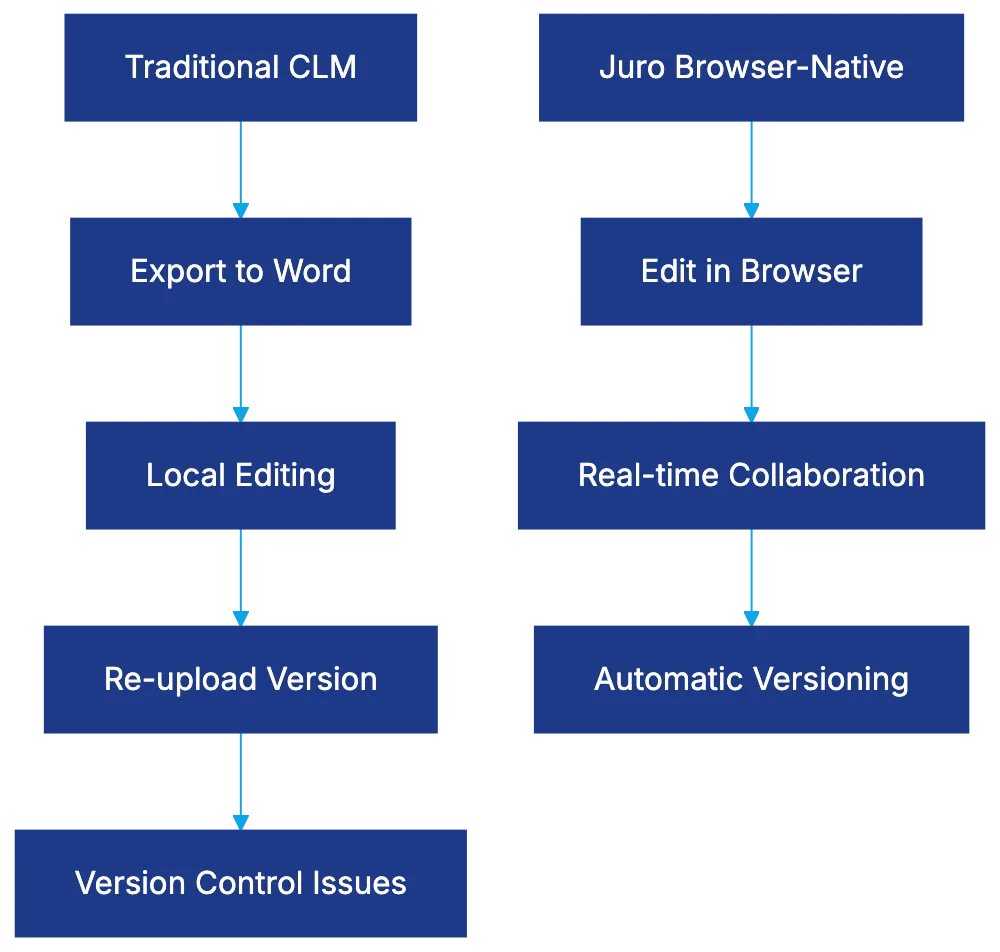
Contract lifecycle management platforms have proliferated, but most share a fundamental limitation: they depend on Microsoft Word for contract creation and editing. This reliance can lead to inefficiencies and version control issues, as users export documents, make edits locally, re-upload versions, and hope nothing breaks. This creates friction as users export documents, make edits locally, re-upload versions, and hope nothing breaks. Juro is browser-native, allowing you to create, edit, negotiate, and execute contracts entirely within the web browser without downloads or version ping-pong. This approach streamlines the contract lifecycle, enabling faster and more efficient workflows.
This Juro review examines whether this architectural difference translates into practical advantages. The platform presents itself as a modern alternative to enterprise CLM systems requiring extensive IT resources. Juro’s user-friendly interface and rapid deployment make it accessible for mid-market legal departments and growth-stage companies. For mid-market legal departments and growth-stage companies, Juro promises a contract workspace easy for business users to adopt without extensive training, providing automation, AI analysis, and workflow management. This empowers legal teams to focus on higher-value tasks by automating routine processes.
Contract Management Approach Comparison:
How Juro CLM Works: The Browser-Native Advantage
The browser-native architecture streamlines contract generation. Users open Juro in their browser, select a template, fill in the fields, and the contract populates automatically. Legal teams build guardrails into templates, defining clauses and customizations. Editing occurs inline, with multiple people working simultaneously, similar to Google Docs. Comments are in the margin, changes are tracked, and approvals route automatically based on contract parameters.
Full contract lifecycle management happens in one environment, including creation, negotiation, execution via e-signature, and post-signature management. This consolidation appeals to legal teams tired of managing separate tools for drafting, signing, and repository management.
Juro Contract Lifecycle Flow:

AI Features: What Actually Works
Juro’s AI analyzes contract language to identify risks, suggest alternative clauses, and flag template deviations. During contract review, the AI highlights unusual provisions. Clause suggestion pulls from contract libraries and approved language banks, assisting less experienced team members. AI’s initial triage and data extraction save paralegal hours but require mature contract processes and playbooks for optimal results.
Collaboration and Workflow Design
Juro’s design assumes contracts require cross-functional input from sales, procurement, finance, and legal. Approval workflows are based on contract attributes, preventing contracts from lingering in email inboxes. Real-time editing and commenting reduce email back-and-forth. The notification system alerts stakeholders at crucial stages, improving visibility across negotiations.
Juro Pricing: What It Actually Costs
Cross-Functional Approval Workflow:
 Juro has a tiered subscription model, transparent compared to enterprise vendors needing custom quotes. Pricing is user-based with different license types. Legal team members who create and negotiate contracts need full licenses; business users executing template contracts have limited licenses at lower prices. Setup costs are lower than traditional enterprise CLM systems, with deployment timelines in days or weeks. E-signature functionality is included.
Combining Capabilities and Tech Stack Fit
Juro integrates with systems contracts typically flow through, like Salesforce and HubSpot. Slack integration allows contract notifications and approvals within channels. An API supports custom integrations, but manual work may be needed for non-standard data mapping.
Juro Compared to Ironclad and LinkSquares
Ironclad targets larger enterprises with broader features and longer setup times, justifying the cost and complexity for Fortune 500 legal departments. LinkSquares competes directly with Juro, focusing on post-signature analytics. Juro prioritizes contract creation. Word-dependent CLM tools rely on familiar processes but face version control complexity.
Setup Reality: What to Expect
For straightforward implementations, Juro’s deployment is fast. Clean templates and defined workflows expedite setup, but standardizing templates and managing change take time. Thoughtful data migration planning is essential. User adoption extends beyond technology readiness.
Who Should Actually Use Juro
Juro is ideal for rapidly growing companies needing more efficient contract processes without enterprise-level complexity. Companies with high-volume, standardized contracts benefit most, allowing business users to handle routine agreements, freeing legal to focus on complex negotiations. Juro is less suited for highly tailored contracts needing significant customization.
Common Implementation Pitfalls
Underestimating template configuration, insufficient business user training, assuming integrations will automatically cover custom needs, and lacking success metrics are common pitfalls. Defining success and measuring baseline performance are crucial for justifying the investment.
Bottom Line
Juro offers a distinct approach by eliminating Word dependency and building a browser-native workspace, improving workflow efficiency and collaboration. The pricing model makes it an attractive option for companies not ready for enterprise-level CLM. Juro faces trade-offs, sacrificing some features compared to Ironclad for ease of administration and emphasizing contract creation over post-signature analytics compared to LinkSquares. The right choice depends on your pain points and priorities.
Frequently Asked Questions
How does Juro improve contract management efficiency?
Juro eliminates the need for Microsoft Word by allowing users to create, edit, and sign contracts directly in the browser. This reduces version control issues and streamlines the entire contract lifecycle within one platform, making processes faster and more efficient.
What types of organizations can benefit from using Juro?
Juro is well-suited for mid-market legal departments and growth-stage companies that require efficient contract processes without the complexities of enterprise systems. Businesses with high volumes of standardized contracts will find it especially useful, as it enables non-legal users to manage routine agreements.
What features does Juro offer for collaboration among teams?
Juro facilitates cross-functional collaboration by allowing multiple stakeholders to edit contracts in real-time and leave comments. It also includes automated approval workflows and notifications to ensure that contracts progress efficiently through the necessary channels.
How does Juro's AI functionality enhance contract review?
Juro's AI assists legal teams by analyzing contract language to identify potential risks and suggesting alternative clauses. It highlights unusual provisions during reviews, aiding less experienced team members and saving valuable time on routine tasks.
What should new users expect during Juro's implementation process?
Juro's deployment is typically fast for straightforward implementations, taking only days or weeks. However, users should anticipate time spent on standardizing templates and ensuring proper data migration to maximize the platform's effectiveness.
Is Juro's pricing structure competitive with other contract management solutions?
Yes, Juro offers a transparent, tiered subscription model based on user licenses, making it more accessible compared to traditional enterprise vendors. The costs are generally lower, with setup expenses and deployment timelines also designed to be more favorable for mid-market companies.
What are some common challenges when implementing Juro?
Common pitfalls include underestimating the complexity of template configuration, insufficient training for business users, and assuming that integrations will automatically fit all custom needs. Defining success metrics upfront and planning for a thoughtful rollout are crucial to avoid these challenges.
Related Articles

AI in Legal Compliance Management: A Comprehensive Guide
Explore the role of AI in legal compliance, automating tasks and monitoring regulations for law firms and corporate legal departments.

Ironclad's Unique Approach to Contract Management
Explore Ironclad's innovative contract management platform, emphasizing automation, AI, and seamless integrations for legal teams.
The Importance of Clause Libraries in Legal Practice
Explore how clause libraries enhance contract management efficiency and compliance in legal practices through standardized language.