Contract Management Workflow: Complete CLM Guide
Table of Contents
- Introduction
- The Complete CLM Process at a Glance
- Stage 1: CLM Process Request, Intake, and Risk Triage
- Stage 2: Contract Automation, Drafting, and Legal Review
- Stage 3: AI Contract Review, Negotiation, and Version Control
- Stage 4: Contract Management Workflow Approval and Execution Controls
- Stage 5: CLM Process Repository, Contract Automation, and Obligation Management
- Stage 6: Contract Management Workflow for Renewal, Amendment, or Termination
- Implementing Contract Lifecycle Management Software for Legal Operations
- Conclusion
- Introduction
- The Complete CLM Process at a Glance
- Stage 1: CLM Process Request, Intake, and Risk Triage
- Stage 2: Contract Automation, Drafting, and Legal Review
- Stage 3: AI Contract Review, Negotiation, and Version Control
- Stage 4: Contract Management Workflow Approval and Execution Controls
- Stage 5: CLM Process Repository, Contract Automation, and Obligation Management
- Stage 6: Contract Management Workflow for Renewal, Amendment, or Termination
- Implementing Contract Lifecycle Management Software for Legal Operations
- Conclusion
Introduction
A reliable contract management workflow, supported by contract lifecycle management software, begins before drafting and continues after signature. Yet many legal teams still use email for requests, competing files for negotiations, and spreadsheets for renewals, causing slow reviews, unclear ownership, missed obligations, and avoidable commercial risk.
Contract lifecycle management software can structure that sequence into a controlled CLM process, while lawyers, paralegals, legal assistants, procurement teams, and business owners provide judgment and accountability.
TL;DR: An effective CLM process combines automation, controlled handoffs, and human oversight from request through renewal or termination.
This guide explains:
- Every stage from request through renewal or termination
- The roles, controls, handoffs, and KPIs at each stage
- Where AI contract review and automation can reduce manual work
- Common failure points and practical ways to prevent them
Source page reviewed in Chrome during article research. Follow the image link for the current page.
The Complete CLM Process at a Glance
Contract lifecycle management manages an agreement throughout its lifespan. DocuSign describes CLM as a process extending from creation to termination, with drafting, negotiation, signing, system integration, storage, and analysis forming part of the lifecycle.
A diagram-ready version of the contract management workflow is:
Request → Intake validation → Risk triage → Drafting → Internal review → Counterparty negotiation → Approval → Signature → Repository and system updates → Obligation monitoring → Renewal decision → Renewal, amendment, or termination
Contract Lifecycle Overview:

Each handoff needs an owner, acceptance criteria, and a time limit. Without those controls, even good contract lifecycle management software becomes an expensive filing cabinet.
| Stage | Primary Owner | Core Control | Suggested KPI | Frequent Failure |
|---|---|---|---|---|
| Request and triage | Business requester and legal operations | Mandatory intake fields | Time to assignment | Incomplete instructions |
| Draft and review | Lawyer or paralegal | Approved templates and playbooks | First-draft time | Obsolete language |
| Negotiate | Deal lawyer and business owner | Version control | Negotiation cycle time | Parallel redlines |
| Approve | Legal, finance, security, executives | Authority matrix | Approval wait time | Unclear approver |
| Execute | Authorized signatories | Signature verification | Time to signature | Wrong signing entity |
| Store and monitor | Legal operations | Metadata validation | Search and extraction accuracy | Missing obligations |
| Renew or terminate | Contract owner | Notice calendar | On-time decision rate | Silent auto-renewal |

Source screenshot: DocuSign, What is Contract Lifecycle Management?.
Stage 1: CLM Process Request, Intake, and Risk Triage
The CLM process starts with a business request, preferably submitted through a structured form instead of free-form email. The requester owns the commercial facts; legal operations owns intake quality; and a lawyer owns the initial legal risk classification.
Contract lifecycle management software should require information such as:
- Contract type, business purpose, and requested completion date
- Correct legal entities and counterparty details
- Contract value, term, renewal model, and governing jurisdiction
- Personal data, confidential information, intellectual property, or regulated activity involved
- Business sponsor, budget owner, and proposed signatories
Contract automation keeps incomplete requests out of the drafting queue and routes complete requests by risk. A low-value NDA using approved terms may follow a self-service path, while a high-value services agreement involving health data should route to legal, privacy, security, and finance.
For example, a law firm assistant requesting an NDA selects an approved template, enters both entities, and confirms no unusual disclosure is planned. The workflow can then generate the document. If the requester asks for residual-knowledge language, AI can identify the deviation and send the request to a lawyer.
Track request-to-assignment time, incomplete requests, volume by contract type, and self-service eligibility. Letting urgency bypass intake may save minutes but cost days later.
Stage 2: Contract Automation, Drafting, and Legal Review
After triage, the assigned lawyer, paralegal, or contract specialist drafts from an approved template linked to a clause library, not a similar contract found in an inbox.
The drafting controls should be visible inside the contract lifecycle management software:
| Control | What It Should Do | Why It Matters |
|---|---|---|
| Template governance | Display only current, approved templates | Prevents obsolete terms from returning |
| Clause playbook | Provide preferred and fallback language | Produces consistent negotiating positions |
| Conditional drafting | Insert clauses based on intake data | Reduces copying and omission errors |
| AI review | Compare the draft with policy and extracted facts | Finds issues for human review |
| Audit history | Record who changed or approved language | Supports accountability |
Contract automation and AI drafting tools can populate names, dates, fees, service descriptions, and standard clauses from intake data while flagging undefined terms, conflicting notice periods, missing schedules, and departures from the limitation-of-liability playbook. A lawyer must confirm the output because AI can misread tables, overlook context, or propose polished but commercially wrong language.
For a sales services agreement, contract lifecycle management software may generate a draft in minutes and flag data-processing terms that do not match the customer’s region for the lawyer to fix before release.
Track first-draft time, template adoption, AI-flag acceptance, data-error rework, and nonstandard clauses, not drafting speed alone.
Stage 3: AI Contract Review, Negotiation, and Version Control
Negotiation is often the slowest part of the CLM process because it mixes legal analysis, commercial decisions, and counterparty response times. DocuSign cites research in which 53% of businesses identified agreement approval as their largest contract-management challenge. The same source warns that email-based negotiation can send late participants to outdated versions.
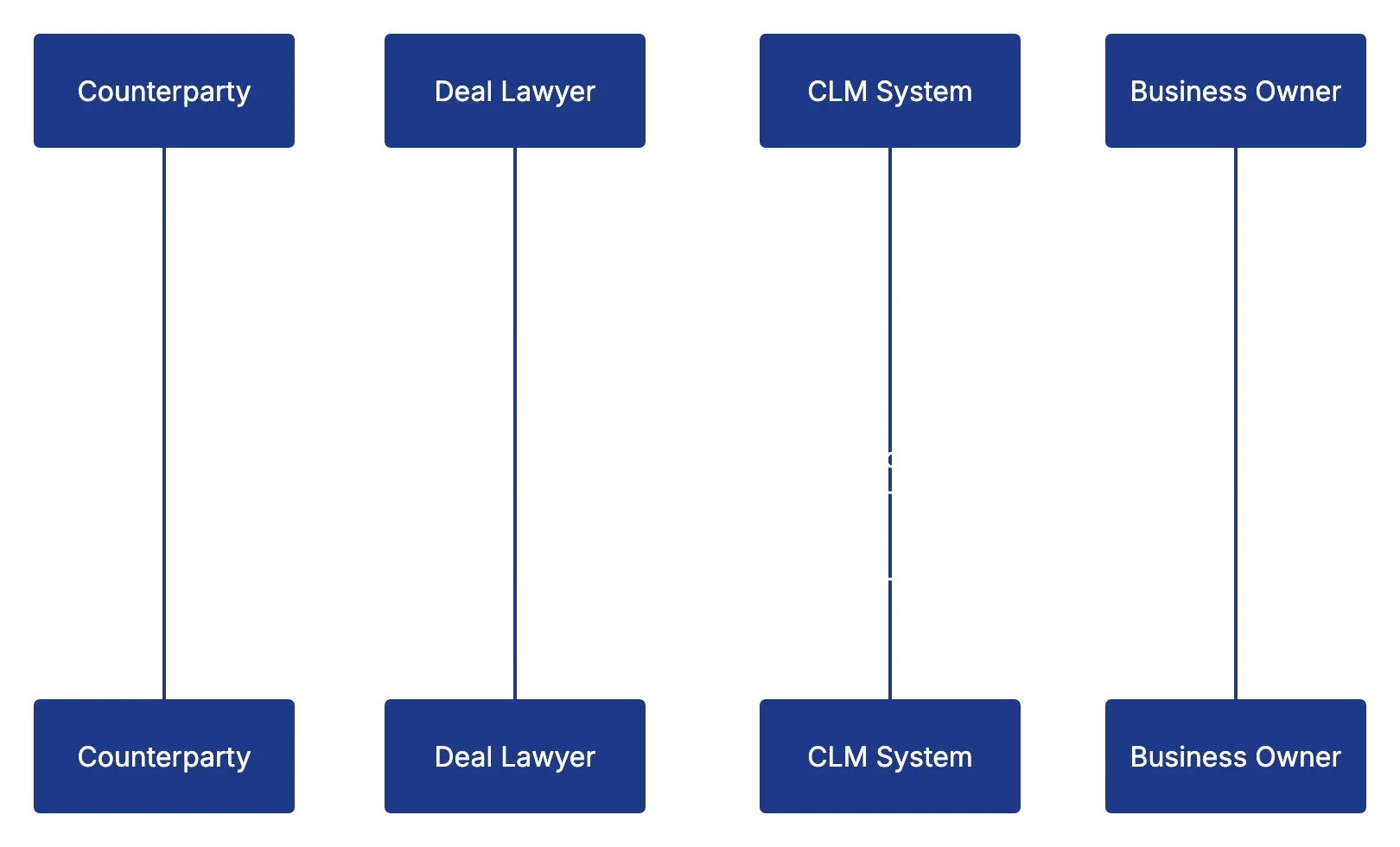
The deal lawyer owns legal positions, the business owner decides commercial trade-offs, and security, privacy, tax, and finance receive only relevant questions. The contract management workflow should maintain one current version, preserve every redline, and show who has the next action.
A useful escalation structure is:
- Accept language within the approved playbook without further escalation.
- Route permitted fallback language to the designated legal reviewer.
- Send material financial or operational departures to the accountable business owner.
- Escalate prohibited terms, such as uncapped exposure in a restricted category, to senior legal leadership.
If a customer demands unlimited liability for all confidentiality breaches, AI contract review can detect and summarize the departure and retrieve the approved fallback, but cannot accept the risk. Authorized legal and business owners make that decision.
Negotiation and Escalation Flow:
Track median negotiation days, external versus internal wait time, redline rounds, repeatedly escalated clauses, and deals abandoned for legal reasons. Avoid invisible handoffs by giving every task a named owner and due date, supported by automated reminders.
Stage 4: Contract Management Workflow Approval and Execution Controls
Agreed wording does not confer authority. Before signature, the contract management workflow must confirm all approvals and the correct signatories and entities.
| Item | What to Check | Why It Matters |
|---|---|---|
| Legal approval | Final text matches the approved redline | Prevents unreviewed last-minute edits |
| Commercial approval | Price, scope, and service levels are accepted | Confirms the business can perform |
| Financial authority | Value falls within the approver’s limit | Enforces delegated authority |
| Entity and signatory | Names and signing powers are correct | Reduces enforceability disputes |
| Attachments | All exhibits and schedules are final | Prevents incomplete execution sets |
Contract lifecycle management software should lock or hash the approved version before e-signature; later textual changes should invalidate approval or trigger controlled reapproval. The execution record should capture timestamps, signer authentication, completed approvals, and the final signed copy.
DocuSign’s overview identifies secure, verifiable signatures as central to the lifecycle and notes that electronic signatures eliminate manual-signing delays. Still, automation cannot fix a bad authority matrix. Organizations should document approval thresholds by value, contract type, risk category, and entity.
Track approval-to-signature time, reapprovals, signature declines, and misrouted envelopes. Common failures include sending a draft, omitting an exhibit, or using an executive whose authority is unconfirmed.
Stage 5: CLM Process Repository, Contract Automation, and Obligation Management
After signature, legal operations must store the executed agreement in a searchable repository and send its operational data to finance, procurement, sales, privacy, and service systems.
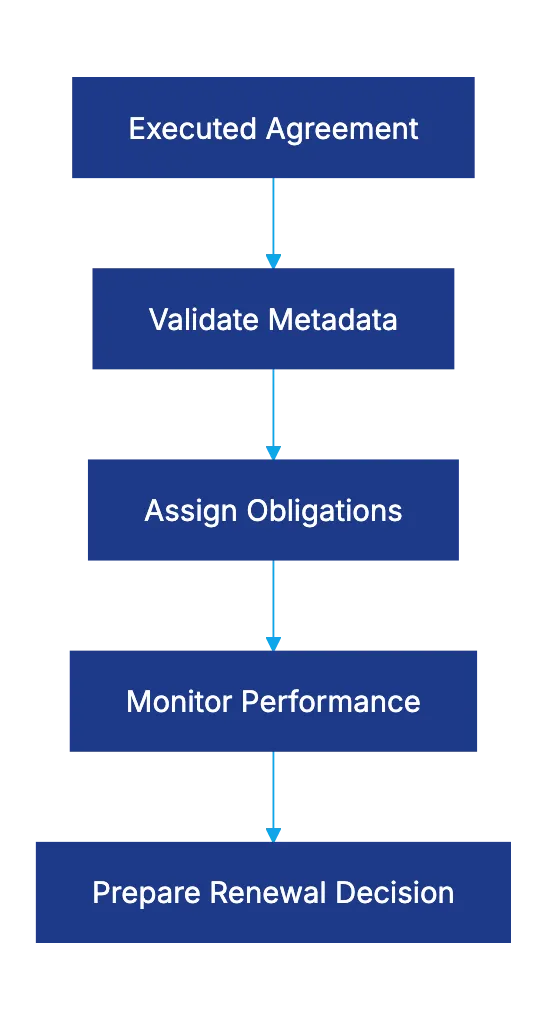
The post-signature CLM process should complete these actions:
- Store the signed agreement and all incorporated schedules
- Confirm metadata such as parties, value, term, notice date, governing law, and owner
- Create obligations, milestones, and approval conditions
- Update CRM, procurement, billing, or matter-management records
- Restrict access according to confidentiality and privilege rules
- Retain the audit trail and applicable retention schedule
DocuSign reports that almost 80% of contract-management professionals regularly use email to share sensitive agreements. Centralized contract lifecycle management software can reduce that exposure with permissions, encryption, and audit histories. The source also cites 2020 research in which 50% of legal professionals reported inefficiencies from manual data transfers and 62% reported regular rework caused by errors.
AI contract review can extract renewal dates, payment duties, insurance requirements, audit rights, service levels, and data-deletion commitments. For example, AI may identify a vendor’s annual security-report duty, prompting the CLM system to assign the vendor owner a task 30 days before it is due. A human should validate high-risk extractions before recording them.
Post-Signature Obligation Flow:
Measure repository completeness, metadata accuracy, obligation completion, failed integrations, and search time. Do not store the PDF while leaving its promises trapped inside.
Stage 6: Contract Management Workflow for Renewal, Amendment, or Termination
Renewal management should begin months before notice is due. The contract owner evaluates performance; procurement or sales reviews commercial terms; finance checks spend or revenue; and legal examines risk, amendments, disputes, and termination rights.
A controlled contract management workflow uses a reverse timeline:
- At 180 or 120 days, confirm the owner, usage, performance, spend, and unresolved issues.
- At 90 days, choose a preliminary path: renew, renegotiate, consolidate, replace, or terminate.
- Before the notice deadline, obtain approvals and send any required notice using the contractually permitted method.
- After the decision, record the renewal, amendment, expiration, or termination and update connected systems.
Contract lifecycle management software may reveal an underused legal-research subscription with a 5% automatic price increase and 60-day notice requirement. AI can summarize the renewal clause and compare invoices with contracted pricing, while the responsible lawyer or procurement professional verifies the clause and decides whether to renegotiate or terminate.
If terminating, the CLM process must track final payments, data return or deletion, transition assistance, survival clauses, property recovery, access revocation, and record retention until completion.
Track timely renewal decisions, avoided auto-renewals, negotiated savings, notice errors, and ownerless contracts. Do not rely on one calendar reminder sent to someone who may change roles.
Implementing Contract Lifecycle Management Software for Legal Operations
Successful contract lifecycle management software starts with process design, not product configuration. DocuSign’s setup guidance recommends executive support, governance, role-based training, current-state mapping, defined success measures, phased deployment, planned migration, and strong testing. Automating every agreement type at once usually magnifies existing confusion.
Use a focused rollout plan:
| Phase | Practical Action | Evidence of Success |
|---|---|---|
| Baseline | Measure current cycle time and failure rates | Reliable starting metrics exist |
| Pilot | Configure one frequent, moderate-risk agreement | Users complete the workflow without side channels |
| Validate | Test permissions, routing, templates, and integrations | Exceptions produce the intended response |
| Expand | Add contract types based on volume and risk | Adoption rises without more rework |
| Govern | Review templates, AI results, and KPIs quarterly | Controls remain current |
Legal teams should ask several questions before selecting contract lifecycle management software:
- Can the system represent the real approval matrix and exception paths?
- Does it preserve privilege, access controls, version history, and audit evidence?
- Can users verify and correct AI-extracted data?
- Does the vendor explain model use, data retention, security, and training practices?
- Can the organization export agreements and metadata in usable formats?
Legal operations should test AI contract review like any other control by sampling extracted fields, recording false positives and negatives, and requiring human review of material clauses. Track total cycle time, stage-specific waits, first-pass approval, template use, obligation completion, renewal readiness, adoption, and escaped errors. Each dashboard metric needs an owner and corrective action.
Conclusion
An effective contract management workflow controls each handoff from request through renewal or termination. Intake captures facts; triage sets the route; templates and playbooks control drafting; version management protects negotiation; approval rules preserve authority; post-signature integration operationalizes contract language; and renewal controls prevent unwanted extensions and missed notices.
Contract lifecycle management software applies those controls at scale. AI contract review can classify requests, identify deviations, extract obligations, and surface renewal risks, but legal and business professionals remain responsible for interpretation and decisions.
Start with one measurable workflow, assign each stage an owner, and test exceptions as carefully as the normal path to make the CLM process dependable, not merely digital.
Frequently asked questions
Where should an organization begin when putting in place a CLM process?
Start with one frequent, moderate-risk contract type and document its owners, approval rules, exceptions, and success metrics. Establish baseline performance before configuring software, then expand only after the pilot works without email or spreadsheet workarounds.
Which contract tasks can be automated safely?
Automation is well suited to intake validation, template generation, routing, reminders, metadata extraction, and renewal alerts. Legal or business owners should still review material clauses, unusual risks, high-impact extracted data, and decisions outside approved playbooks.
How can legal teams prevent version-control problems during negotiation?
Keep one authoritative draft in the CLM system, preserve each redline, and assign the next action to a named person with a due date. Parallel email attachments should be avoided because they make it difficult to identify the current and approved wording.
What information should a contract intake form require?
At a minimum, collect the contract type, purpose, parties, value, term, jurisdiction, requested deadline, business owner, and proposed signatories. The form should also identify sensitive data, intellectual property, regulated activity, and other factors that affect risk routing.
How should AI contract review be validated?
Test AI outputs against a representative sample of agreements and track both missed issues and incorrect flags. Require human validation for material clauses, obligations, dates, and risk decisions, especially when tables, schedules, or unusual drafting are involved.
What should happen immediately after a contract is signed?
Store the complete execution set, validate key metadata, create obligation and milestone tasks, and update relevant business systems. Access permissions, the audit trail, and retention requirements should also be confirmed so the agreement remains searchable and controlled.
How can teams avoid missed renewals and unwanted auto-renewals?
Use multiple reminders that begin well before the contractual notice deadline, with a current owner assigned to each decision. Review performance, usage, pricing, risks, and termination requirements early enough to obtain approvals and deliver notice using the required method.