
Guide to Legal Document Automation Software
Table of Contents
- Introduction
- What Legal Document Automation Actually Does
- HotDocs: The Enterprise Standard
- Gavel: No-Code Deterministic Automation
- Docassemble: Open Source Powerhouse
- Lawyaw: Court Forms and Practice Management Integration
- Legito: European Focus with Enterprise Lifecycle Management
- Clio Draft: Native Integration Advantage
- Smokeball: Forms Library with Automatic Time Tracking
- ContractExpress: Enterprise Document Generation
- Woodpecker: Legal-Specific Workflow Automation
- Knackly: Attorney-Built for Attorney Use
- Plexus: High-Volume Transactional Focus
- Open Source Considerations
- Choosing the Right Platform for Your Firm
- Bottom Line
- Introduction
- What Legal Document Automation Actually Does
- HotDocs: The Enterprise Standard
- Gavel: No-Code Deterministic Automation
- Docassemble: Open Source Powerhouse
- Lawyaw: Court Forms and Practice Management Integration
- Legito: European Focus with Enterprise Lifecycle Management
- Clio Draft: Native Integration Advantage
- Smokeball: Forms Library with Automatic Time Tracking
- ContractExpress: Enterprise Document Generation
- Woodpecker: Legal-Specific Workflow Automation
- Knackly: Attorney-Built for Attorney Use
- Plexus: High-Volume Transactional Focus
- Open Source Considerations
- Choosing the Right Platform for Your Firm
- Bottom Line
Introduction
Legal document automation software has transformed how law firms manage tasks like document creation. Previously, paralegals spent hours manually preparing documents. Now, automated document generation occurs in minutes due to intelligent templates and conditional logic. Options range from enterprise-grade to no-code solutions for solo practitioners. This guide examines twelve tools, covering automation capabilities, technical needs, pricing, and setup timelines, to help select the best system for your firm.
What Legal Document Automation Actually Does
Legal document automation software creates dynamic interviews from static templates, generating completed documents based on client details. Attorneys fill forms once, eliminating manual edits and reducing risks of missing clauses or errors. The software populates multiple documents, applies conditional logic, and ensures consistency.
Legal Document Automation Process:
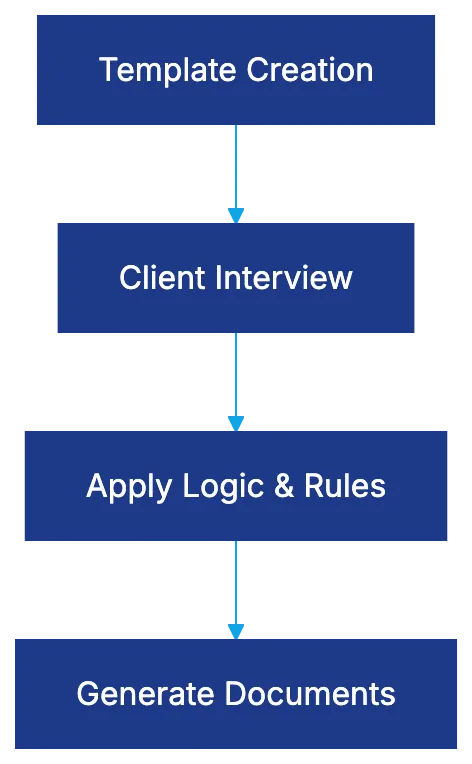
The technology captures information, applies business logic, and assembles final documents with correct formatting and references. Beyond mail merge, it manages complex logic, performs calculations for documents like child support worksheets, and handles repetitive data. Systems maintain clause libraries and version control, reducing preparation time and errors across hundreds or thousands of documents annually.
HotDocs: The Enterprise Standard
How Document Automation Works:

HotDocs dominates the legal document automation market, especially for complex scenarios. It uses a proprietary scripting language for intricate logic. HotDocs divides template development and end-user interviews, benefiting firms with dedicated tech teams but requiring technical resources for updates. Pricing is enterprise-based, starting at $60–80 monthly for cloud deployments, with setup timelines of six months to a year.
Gavel: No-Code Deterministic Automation
Gavel offers deterministic, rules-based document generation, crucial in legal work for control over clause appearance. It features no-code template creation and a visual interface accessible to non-technical users. Originating from access-to-justice work, Gavel includes mobile-friendly, client-facing tools. Pricing starts at $83 monthly, with setup faster than enterprise platforms. It integrates with Clio for data integration.
Docassemble: Open Source Powerhouse
Docassemble is an open-source platform built on Python, offering extensive control while remaining readable for non-programmers. It runs on Docker containers, providing complete data hosting control. Features include user authentication, task processing, and real-time collaboration. It requires technical expertise but offers no per-user licensing costs. Setup timelines vary.
Lawyaw: Court Forms and Practice Management Integration
Lawyaw provides a vast library of pre-built court forms, delivering immediate value for practice areas reliant on standardized documents. It integrates with Clio, automating client and matter information input. Pricing is $69 per user monthly. Setup is quick with pre-built forms, with custom development following typical learning curves.
Legito: European Focus with Enterprise Lifecycle Management
Legito focuses on contract lifecycle management, ideal for international or European-clients. It manages contracts as business processes, not just documents. The automation engine uses a visual template editor allowing simple and complex automation without programming. Pricing is enterprise-based, costing hundreds monthly, with setup timelines varying.
Clio Draft: Native Integration Advantage
Clio Draft provides document automation within the Clio environment, ensuring seamless data integration. It supports conditional logic and repeating content. Pricing is part of a Clio Suite subscription. Setup speed depends on template development.
Smokeball: Forms Library with Automatic Time Tracking
Smokeball combines document automation with practice management, offering a broad legal forms library. Automatic time tracking increases recorded hours. Pricing ranges from $99–179 monthly. Smokeball bundles practice management and billing, offering value to small firms.
ContractExpress: Enterprise Document Generation
ContractExpress excels in complex, high-volume document scenarios. It separates authoring environments from user interfaces and supports advanced scenarios. Pricing involves negotiated licensing, typically hundreds of thousands annually.
Woodpecker: Legal-Specific Workflow Automation
Woodpecker combines document generation with task automation within workflows. Pricing is $79–129 monthly. Setup includes workflow and template development, suitable for firms standardizing processes.
Knackly: Attorney-Built for Attorney Use
Knackly features plain language interfaces for sophisticated scenarios. It integrates with Clio, automating data entry. Pricing starts at $100 monthly. Setup is quick for tech-savvy firms.
Plexus: High-Volume Transactional Focus
Plexus automates multi-document transactions, ideal for real estate closings. Pricing is per-transaction, and setup involves mapping workflows. Plexus suits high-volume, consistent documentation needs.
Open Source Considerations
Choosing between open-source platforms and commercial solutions depends on technical capabilities and ownership costs. Docassemble needs expertise in Python and server management, while commercial platforms offer managed infrastructure. Weigh vendor independence against internal reliance risks.
Choosing the Right Platform for Your Firm
Platform Selection Decision Flow:
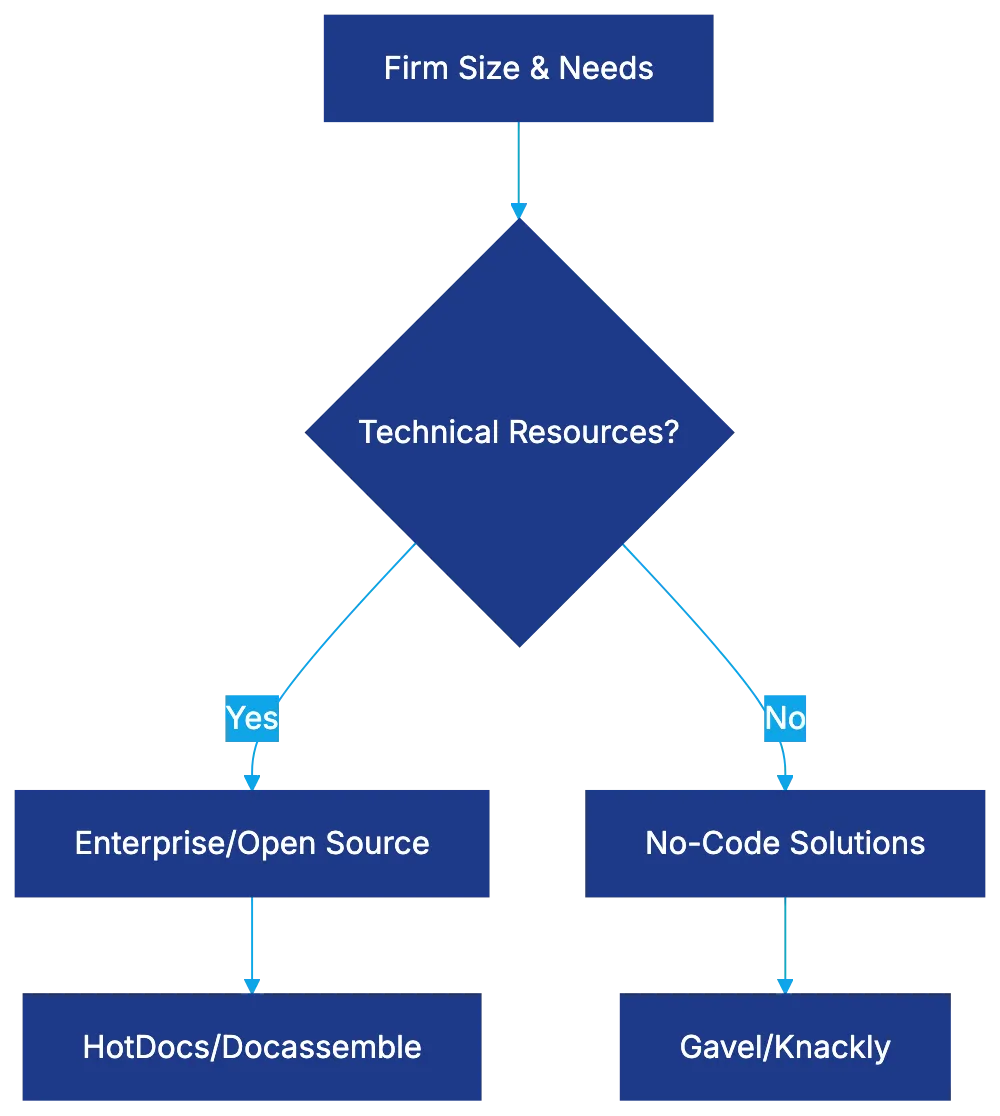
Selection depends on technical resources, document complexity, existing tech environment, client-facing vs internal use, setup timeline, and total cost. Choose a platform matching your firm’s needs for efficient implementation.
Bottom Line
Legal document automation software enhances efficiency. HotDocs and ContractExpress suit large organizations needing complex automation, while Gavel and Knackly offer sophisticated solutions without coding. Docassemble empowers tech teams, and Lawyaw and Smokeball offer immediate value through forms. Select a platform tailored to your firm’s requirements for effectiveness.
Frequently Asked Questions
How can legal document automation improve my firm's efficiency?
Legal document automation streamlines the document creation process by reducing manual input and minimizing errors. Attorneys only need to input client details once, resulting in quicker document generation and improved accuracy. This allows legal professionals to focus on higher-value tasks instead of repetitive document preparation.
What factors should I consider when choosing a document automation tool?
When selecting a document automation tool, evaluate factors such as your firm's technical resources, the complexity of your documents, and the tool's integration capabilities with existing systems. Additionally, consider the setup time, pricing structure, and whether the solution is user-friendly for non-technical staff.
Is there a cost-effective option for small law firms?
Yes, several document automation tools cater to small law firms, offering competitive pricing without sacrificing functionality. Options like Gavel and Smokeball provide robust solutions for under $100 monthly. Additionally, some platforms have quick setup timelines, making them accessible for smaller practices.
What is the significance of conditional logic in document automation?
Conditional logic allows the automation software to tailor documents based on specific inputs or scenarios. This ensures that only relevant clauses or sections appear in the final document, enhancing accuracy and relevance. It is particularly useful for handling complex legal scenarios or client-specific needs.
What technical expertise is required to implement open-source document automation solutions?
Open-source solutions like Docassemble usually require some technical expertise, particularly in programming languages such as Python, as well as server management skills. Without this knowledge, firms may find it challenging to set up and customize the software effectively. However, once established, they can enjoy greater control over their data and infrastructure.
Can legal document automation tools integrate with practice management software?
Many legal document automation tools, such as Lawyaw and Clio Draft, offer integration with practice management solutions. This integration streamlines data entry by automatically populating client and matter information from existing databases, helping to eliminate duplicate work and improve overall efficiency.
How do I ensure the security of sensitive client information during document automation?
To ensure the security of client information, choose document automation platforms that prioritize data protection, including features like encryption and secure user authentication. Additionally, consider platforms that comply with legal industry standards, and maintain best practices for data storage and access to safeguard sensitive information.
Related Articles

Harvey AI Review: Advanced Legal AI for Law Firms
Explore how Harvey AI transforms legal workflows, offering tailored solutions and superior performance for large law firms.

A Comprehensive Guide to Legal Document Automation
Explore the benefits, platforms, and strategies of legal document automation for enhanced efficiency in legal practices.
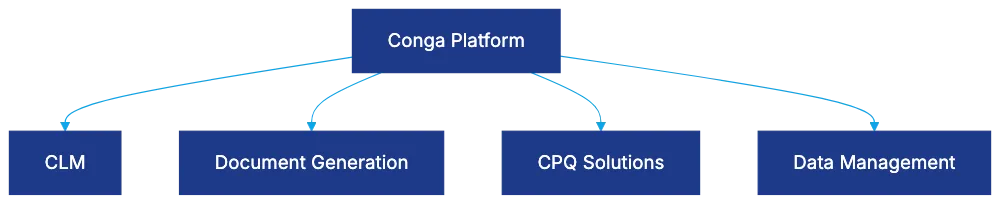
Conga: Revolutionizing Legal Technology for Professionals
Discover how Conga streamlines contract management and document generation for legal teams using Salesforce.